

CityGML and 3D City Modeling Course
About our
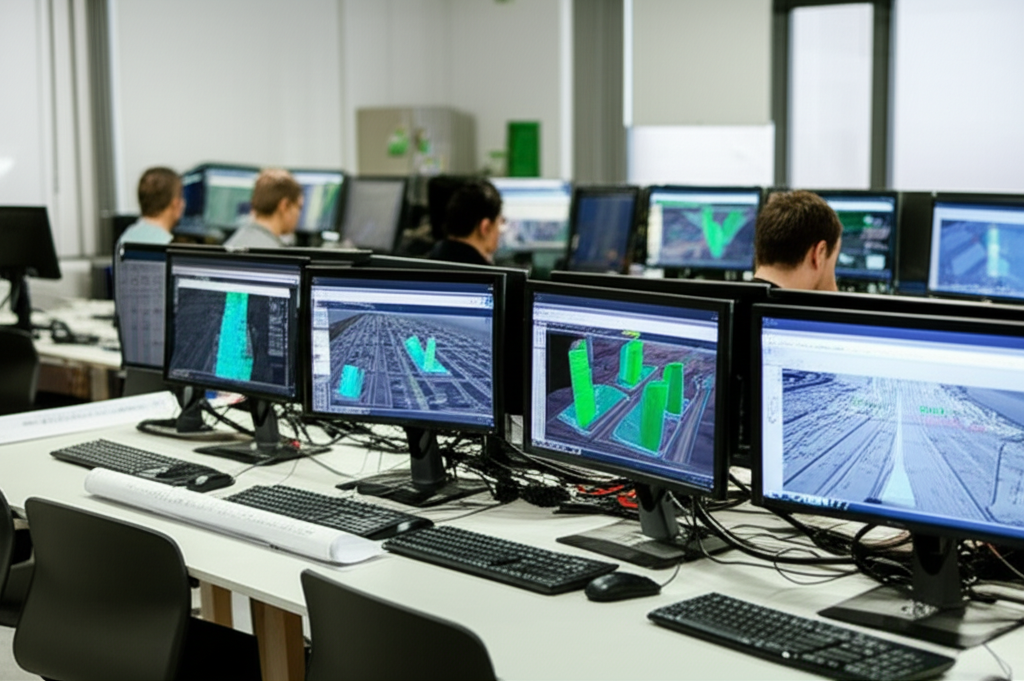
The CityGML and 3D City Modeling Course teaches how to create detailed 3D models of urban environments using the CityGML standard. It focuses on representing urban elements such as buildings, infrastructure, and vegetation, employing BIM and GIS modeling techniques. Participants learn to import data, structure information, and visualize realistic models, essential for urban planning, scenario simulation, and land management applications.
The course provides hands-on experience using specialized software for creating and editing CityGML models, including spatial analysis and advanced visualization tools. Different Levels of Detail (LOD) and the integration of geographic data to enrich the models are explored. This training prepares professionals for roles in digital urbanism, geospatial data analysis, and the application of Smart Cities, improving efficiency and decision-making in urban environments.
CityGML and 3D City Modeling Course
- Format: Online
- Duration: 3 months
- Hours: 300 H
- Language: English / Spanish
- Registration date: 23-10-2026
- Start date: 12-12-2026
- Available places: 2
320 $
Competencies and results
What you will learn
1. Mastering 3D Urban Modeling with CityGML: From Theory to Practice
-
CityGML Fundamentals: Understanding the structure and standard for 3D city modeling.
-
Data Import and Preparation: Acquiring, importing, and preparing geospatial data for modeling in CityGML.
-
Modeling Urban Entities: Creating detailed 3D models of buildings, structures, vegetation, and infrastructure using CityGML.
-
Attributes and Semantics: Assigning semantic attributes to 3D models to represent relevant information, such as land use, materials, and properties.
-
Visualization and Analysis: Using tools to visualize 3D models and perform spatial analyses, such as collision detection, visibility analysis, and volume calculations.
-
Interoperability: Learning how to export and import CityGML models to different formats and platforms for use in various applications.
Practical Applications: Explore case studies and real-world examples of urban 3D modeling with CityGML in areas such as urban planning, resource management, and risk analysis.
Advanced Workflows: Develop advanced workflows for city modeling using CityGML, including automation and scripting.
Model Management and Maintenance: Learn techniques for managing, updating, and maintaining 3D city models over time.
Integration with Other Technologies: Integrate CityGML models with other technologies, such as Geographic Information Systems (GIS) and Building Information Modeling (BIM).
2. Creating 3D City Models with CityGML: A Complete Approach
- Geographic Data Modeling and Representation: You will master the use of CityGML for creating detailed 3D models of cities. You will learn to import, structure, and manipulate complex geospatial data.
Understanding the Structure of CityGML: You will delve into the architecture of CityGML, understanding its different levels of detail (LoD) and its ability to represent a wide range of urban elements, from buildings to street furniture.
3D Modeling Workflows: You will explore efficient methodologies for creating 3D city models, including data acquisition, processing, and model optimization for different applications.
Data and Attribute Integration: You will learn to enrich your 3D models with relevant attributes and metadata, such as information on materials, physical properties, and historical data.
3D Model Visualization and Analysis: You will develop skills in visualizing and analyzing 3D city models, using specialized software to perform simulations and urban studies.
Practical Applications of CityGML: You will discover diverse applications of 3D city models, including urban planning, infrastructure management, event simulation, and environmental impact analysis.
Specific Tools and Software: You will become familiar with the most commonly used tools and software for creating and processing CityGML models, including geospatial data editors and 3D viewers.
Model Optimization and Performance: You will learn how to optimize your 3D models to improve performance and efficiency, especially for applications that require high processing power.
Standards and Best Practices: You will learn about the standards and best practices for creating and using CityGML models, ensuring the interoperability and compatibility of your models.
Case Studies and Practical Examples: You will analyze real-world case studies and practical examples to apply your knowledge and develop your skills in creating 3D city models with CityGML.
3. Comprehensive user-oriented design and validation (from modeling to manufacturing)
You will learn to integrate the entire product development process, from initial model conception to final validation, applying user-centered methodologies. You will develop skills in parametric design, ergonomics, simulation, sustainable materials, 3D visualization, and manufacturing management, ensuring efficient, safe solutions that meet current industry standards.
4. Transformation of Geospatial Data into Intelligent 3D Models with CityGML
4. Transforming Geospatial Data into Intelligent 3D Models with CityGML
Understand the structure and format of CityGML data for representing urban environments in 3D.
Acquire skills in importing and preparing geospatial data, including LiDAR data, orthophotos, and digital elevation models (DEMs).
Learn to use specialized tools and software for transforming geospatial data into intelligent 3D models optimized for CityGML.
Master the techniques for modeling and editing 3D geometries in CityGML, including creating buildings, vegetation, street furniture, and other environmental elements.
Implement the semanticization of 3D models in CityGML, adding relevant geospatial information and attributes for analysis and visualization.
Explore the possibilities of integrating CityGML 3D models with Geographic Information Systems (GIS) and other applications.
Learn to perform spatial analyses and simulations using CityGML 3D models, such as visibility analysis, shadow studies, and flow modeling.
Understand the standards and best practices for data quality and interoperability in the creation of CityGML 3D models.
Develop skills in visualizing and presenting CityGML 3D models, including creating renders, animations, and virtual tours.
Explore the applications of CityGML 3D models in various fields, such as urban planning, emergency management, tourism, and augmented reality.
5. Advanced Exploration in CityGML: Modeling and Visualization of 3D Urban Environments
5. Advanced Exploration in CityGML: Modeling and Visualizing 3D Urban Environments
- Understand the structure and format of CityGML for modeling 3D urban environments.
- Master the tools and techniques for creating and editing 3D models of buildings, infrastructure, and urban elements using CityGML.
- Learn to import, export, and manage geospatial data in CityGML format.
- Explore advanced visualization options, including realistic rendering and integration with GIS systems.
- Apply CityGML in urban analysis, simulation, and smart city management projects.
- Customize and extend the CityGML schema to suit specific modeling needs.
- Use specialized software for processing and visualizing CityGML models at a large scale.
- Implement efficient workflows for the Creation, maintenance, and updating of 3D urban models.
6. 3D Modeling of Cities with CityGML: Design, Implementation and Analysis
6. 3D City Modeling with CityGML: Design, Implementation, and Analysis
- Understand the structure and standards of CityGML for 3D city modeling.
- Design 3D city models using CityGML, including the representation of buildings, terrain, vegetation, and infrastructure.
- Implement CityGML models on different platforms and software, such as ArcGIS, QGIS, and web platforms.
- Analyze the quality and accuracy of CityGML models, identifying and correcting errors.
- Apply CityGML for spatial analysis and simulations, including visibility studies, shadow analysis, and resource management.
- Integrate CityGML models with other data sources, such as LiDAR and geospatial data.
- Use CityGML for the visualization and communication of urban data in 3D.
Evaluate the performance and scalability of CityGML models in different environments.
Adapt and customize CityGML models to meet specific project and application needs.
Learn about the latest trends and advancements in 3D city modeling with CityGML.
Who this program is for:
CityGML and 3D City Modeling Course
- Professionals in architecture, urban planning, and earth sciences.
- Civil engineers, geographers, and surveyors interested in 3D city modeling.
- Technicians and specialists in geographic information systems (GIS) and 3D modeling.
- Researchers and academics who wish to delve deeper into CityGML and its applications.
- Standards-driven curriculum: you will work with CS-27/CS-29, DO-160, DO-178C/DO-254, ARP4754A/ARP4761, ADS-33E-PRF from the first module.
- Accreditable laboratories (EN ISO/IEC 17025) with rotor bench, EMC/Lightning pre-compliance, HIL/SIL, vibrations/acoustics.
- Evidence-oriented TFM: safety case, test plan, compliance dossierand operational limits.
- Mentored by industry: teachers with experience in rotorcraft, tiltrotor, eVTOL/UAM and flight test.
- Flexible modality (hybrid/online), international cohorts and support from SEIUM Career Services.
- Ethics and security: safety-by-design approach, cyber-OT, DIH and compliance as pillars.
1.1 Introduction to CityGML: Origins and evolution of the standard.
1.2 Key concepts of urban 3D modeling and their importance.
1.3 Structure and components of CityGML: LOD (Level of Detail) and its implications.
1.4 Installation and configuration of CityGML modeling software.
1.5 First steps in creating basic 3D models with CityGML.
1.6 Importing and exporting geospatial data in CityGML-compatible formats.
1.7 Understanding the hierarchy of objects and attributes in CityGML.
1.8 Basic visualization of 3D models created with CityGML.
1.9 Case studies: examples of urban 3D modeling using CityGML.
1.10 Introduction to the applications and potential of CityGML.
2.2 Introduction to CityGML and its application in urban 3D modeling
2.2 CityGML structure and key concepts: levels of detail (LoD) and objects
2.3 Designing the database for 3D models with CityGML
2.4 Importing and preparing geospatial data for CityGML
2.5 Modeling buildings: geometry, attributes, and textures
2.6 Modeling urban elements: terrain, vegetation, and street furniture
2.7 Visualizing and analyzing 3D models with CityGML
2.8 Interoperability and standards: exchanging CityGML models
2.9 Tools and software for creating CityGML models
2.20 Practical examples and case studies of urban 3D modeling
3.3 Introduction to CityGML Implementation: Key Concepts and Workflow
3.2 Selecting and Preparing Geospatial Data for CityGML
3.3 Configuring Software and Tools for CityGML Modeling
3.4 Implementing Basic 3D Models in CityGML
3.5 Optimizing the CityGML Data Structure for Performance
3.6 Advanced Optimization Techniques: LOD and Attributes
3.7 Integrating External Data into CityGML Models
3.8 Troubleshooting Common Implementation and Optimization Problems
3.9 Best Practices for Managing and Maintaining CityGML Models
3.30 Evaluating and Continuously Improving 3D Urban Models
4.4 Introduction to Geospatial Conversion: Key Concepts
4.2 Geospatial Data Formats for CityGML: Shapefiles, GeoJSON, and More
4.3 Data Preprocessing: Cleaning and Preparation for 3D Modeling
4.4 Importing Geospatial Data into CityGML Modeling Software
4.5 Building Modeling: Extrusion, Texturing, and Detailing
4.6 Terrain and Urban Landscape Modeling
4.7 Incorporating Attributes and Metadata into 3D Models
4.8 Validation and Quality Control of 3D Models
4.9 Exporting and Publishing 3D Models in CityGML Format
4.40 Practical Applications: Urban Analysis, Visualization, and Simulation
5.5 Key Concepts of 3D Urban Modeling
5.5 Introduction to CityGML and its Structures
5.3 Installation and Configuration of CityGML Software
5.4 Creating Initial Simple 3D Models
5.5 Importing and Exporting Data in CityGML Format
5.6 Basic Visualization of 3D Urban Models
5.7 Initial Applications and Case Studies
5.8 Best Practices and Initial Tips
5.5 Designing 3D City Models: Strategies
5.5 Selecting Software and Advanced Tools
5.3 Modeling Buildings: Geometry, Attributes, and Textures
5.4 Modeling Infrastructure: Roads, Bridges, and Tunnels
5.5 Modeling Vegetation and Natural Features
5.6 Implementing Details: Street Furniture and Signage
5.7 Data Integration: Informational Modeling Geospatial
5.8 Exporting and Preparing for Visualization
3.5 Optimization Strategies for CityGML
3.5 Mesh Reduction and Simplification Techniques
3.3 Optimizing Textures and Materials
3.4 Implementing Levels of Detail (LOD)
3.5 Optimizing for Different Platforms
3.6 Integrating with Databases and GIS Systems
3.7 Performance Analysis and Troubleshooting
3.8 Scalability and Maintenance Strategies
4.5 Introduction to Geospatial Data
4.5 Data Transformation: Formats and Conversions
4.3 Importing Geospatial Data into CityGML
4.4 Georeferencing and Aligning 3D Models
4.5 Integrating Data: Height, Orthoimages, and LiDAR
4.6 Creating Geospatial Attributes
4.7 Implementing 3D Models Intelligent
4.8 Data Analysis and Validation
5.5 Advanced Building Modeling: Details and Complexity
5.5 Interior Modeling: Spaces and Furniture
5.3 Terrain and Geological Feature Modeling
5.4 Advanced Visualization: Lighting and Special Effects
5.5 Integration with Rendering Engines
5.6 Animation and Creation of Urban Scenes
5.7 Shadow and Visibility Analysis
5.8 Exploration of Virtual and Augmented Reality Techniques
6.5 CityGML-Assisted Urban Design
6.5 Visual and Environmental Impact Analysis
6.3 Traffic and Pedestrian Flow Simulation
6.4 Noise and Pollution Analysis
6.5 Urban Sustainability Assessment
6.6 Integration with Geographic Information Systems
6.7 Urban Project Design and Presentations
6.8 Data-Driven Decision Making
7.5 CityGML Fundamentals: Structure and Concepts
7.5 Applications in Urban Planning and Risk Management
7.3 Applications in Tourism and Cultural Heritage
7.4 Applications in Smart Cities and the Internet of Things
7.5 3D Modeling of Buildings and Infrastructure
7.6 Modeling of Natural Features
7.7 Data and Attribute Integration
7.8 Case Studies and Future Trends
8.5 Platforms and Development Engines for Interactive Models
8.5 Implementing Interaction in 3D Models
8.3 Creating User Interfaces
8.4 Real-Time Data Integration
8.5 Modeling Urban Simulations
8.6 Mobile and Web Application Development
8.7 Optimization for Mobile Devices
8.8 Designing Immersive Experiences
6.6 Introduction to CityGML and Urban 3D Modeling
6.2 Theoretical Foundations of Urban 3D Modeling
6.3 Practical Applications of CityGML in 3D Modeling
6.4 Tools and Software for Modeling with CityGML
6.5 Creating Basic 3D Models of Urban Environments
6.6 Importing and Exporting Data in CityGML Format
6.7 Getting Started with 3D Model Visualization
6.8 Case Studies and Practical Examples
2.6 Designing the CityGML Data Structure
2.2 Selecting Appropriate Levels of Detail (LoD)
2.3 Modeling Buildings: Geometry, Textures, and Attributes
2.4 Modeling Infrastructure: Roads, Bridges, and Tunnels
2.5 Modeling Vegetation and Natural Features
2.6 Integrating External Data: LiDAR and GIS Data
2.7 Advanced Urban 3D Modeling Techniques
2.8 Designing Models for Different Purposes Analysis, Simulation, Visualization
3.6 Geometry and Texture Optimization Techniques
3.2 Simplifying 3D Models to Improve Performance
3.3 Using LOD for Visual Optimization
3.4 Optimizing CityGML Data for Better Performance
3.5 3D Model Compression and Storage Techniques
3.6 Integration with Spatial Databases
3.7 Performance Testing and Optimization Analysis
3.8 Optimization Best Practices and Tools
4.6 Introduction to Geospatial Data and Its Relationship with CityGML
4.2 Supported Geospatial Data Formats (SHP, GeoJSON, etc.)
4.3 Converting 2D Data to 3D Models with CityGML
4.4 Integrating LiDAR and Aerial Imagery Data
4.5 Modeling Geospatial Attributes and Metadata
4.6 Creating Intelligent 3D Models with Geospatial Data
4.7 Spatial Analysis and queries in 3D models
4.8 Applications of geospatial data in urban modeling
5.6 Advanced building modeling: facades, roofs, and details
5.2 Modeling of complex objects: street furniture, vehicles, etc.
5.3 Advanced UV Texturing and Mapping Techniques
5.4 Visualizing 3D Models in Different Environments (Web Applications, Desktop)
5.5 Implementing Lighting and Shadow Systems
5.6 Exploring Visualization and Rendering Tools
5.7 Integrating 3D Models with Geographic Information Systems (GIS)
5.8 Creating Impactful Presentations and Visualizations
6.6 Conceptual Design of Urban 3D Models
6.2 Selecting Tools and Software for Implementation
6.3 Implementing Large-Scale 3D Models
6.4 Data Integration and Attribute Creation
6.5 Visibility and Line-of-Sight Analysis
6.6 Flood Simulation and Risk Analysis
6.7 Environmental and Energy Impact Analysis
6.8 Scenario Design and Analysis of Urban Scenarios
7.6 History and Evolution of CityGML
7.2 Structure and Key Components of CityGML
7.3 Applications in Urban Planning and Management Resources and Tourism
7.4 The Role of CityGML in Smart City Development
7.5 Modeling Buildings, Terrain, and Infrastructure
7.6 Modeling Vegetation and Natural Features
7.7 Integration with GIS Systems and Spatial Databases
7.8 Success Stories and Practical Application Examples
8.6 Introduction to Interactive 3D Models
8.2 Tools for Developing Interactive Applications
8.3 Integrating CityGML Models into Interactive Environments
8.4 Implementing Navigation and Manipulation Controls
8.5 Designing Intuitive User Interfaces
8.6 Incorporating Real-Time Data and Simulations
8.7 Developing Interactive Web and Mobile Applications
8.8 Case Studies and Examples of Interactive Applications
- Hands-on methodology: test-before-you-trust, design reviews, failure analysis, compliance evidence.
- Software (depending on licenses/partners): MATLAB/Simulink, Python (NumPy/SciPy), OpenVSP, SU2/OpenFOAM, Nastran/Abaqus, AMESim/Modelica, acoustics tools, planning toolchains DO-178C.
- SEIUM Laboratories: scale rotor bench, vibrations/acoustics, EMC/Lightning pre-compliance, HIL/SIL for AFCS, data acquisition with strain gauging.
- Standards and compliance: EN 9100, 17025, ISO 27001, GDPR.
Capstone-type projects
- Urban 3D Modeling: CityGML; design, implementation, and analysis of models.
- Implementation & Optimization: Interactive 3D; transformation of geospatial data.
- Advanced CityGML: Modeling and visualization of 3D urban environments.
- CityGML Applications: Fundamentals, comprehensive city modeling.
- Urban 3D Modeling: Design and optimization with CityGML; environmental impact analysis; scenario simulation.
- CityGML & GIS: Geospatial data integration; development of interactive visualizations; advanced urban analysis.
- Intelligent 3D Environments: Implementation of dynamic models; flow simulation; infrastructure analysis.
- Interactive 3D Urban Modeling: CityGML, visualization and analysis of naval scenarios
- 3D Naval Simulation: Implementing CityGML for training and planning
- Naval Geospatial Analysis: CityGML applied to route optimization and management
- Urban 3D Simulation: Optimized CityGML models; interactive visualization; geospatial analysis.
- Platform Development: Design, implementation, and analysis of complex 3D models.
- Data Integration: Geospatial transformation to intelligent 3D models with CityGML.
Admissions, fees, and scholarships
- Profile: Background in Computer Engineering, Mathematics, Statistics, or related fields; practical experience in NLP and valued information retrieval systems.
- Documentation: Updated CV, academic transcript, SOP/statement of purpose, project examples or code (optional).
- Process: Application → Technical evaluation of profile and experience → Technical interview → Review of case studies → Final decision → Enrollment.
- Fees:
- Single payment: 10% discount.
- Payment in 3 installments: No fees; 30% upon registration + 2 equal monthly payments of the remaining 35%.
Monthly payment: available with a 7% commission on the total; annual review.
Scholarships: based on academic merit, financial need, and promoting inclusion; agreements with companies in the sector for partial or full scholarships.
See “Calendar & Calls for Applications,” “Scholarships & Grants,” and “Fees & Financing” in the SEIUM mega-menu.
Do you have any questions?
Our team is ready to help you. Contact us, and we will respond as soon as possible.
F. A. Q
Frequently asked questions
Yes, we have international certification
Yes: experimental models, real data, applied simulations, professional environments, real case studies.
It is not mandatory. We offer leveling tracks and tutoring.
Completely. It covers e-propulsion, integration, and emerging regulations (SC-VTOL).
Recommended. There are also internal challenges and consortiums.
Yes. Online/hybrid modality with planned labs and visa support (see “Visa & Residence”).